|
Library Configuration Tab
|   |
|
Library Configuration Tab
| |
The Library Configuration Tab allows the Telecom Engine to be configured to load the same set of back-end libaries each time it is run.
Below is a screen shot of the Libary Configuration Window:
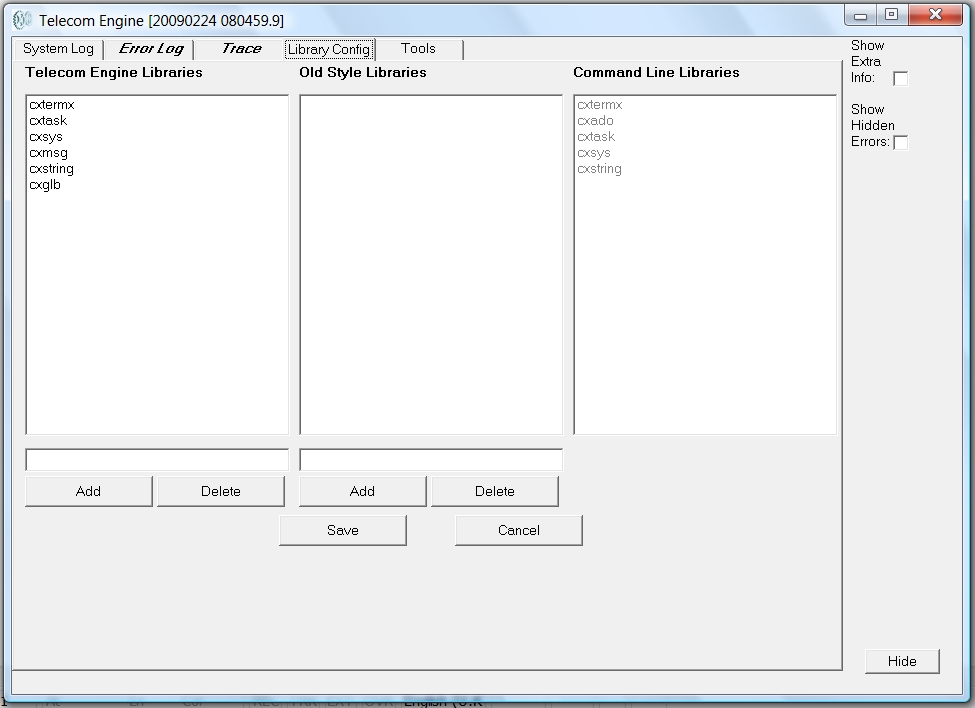
The left pane displays (and allows editing of) the list of back-end Telecom Engine libaries that will be loaded by default upon start-up (unless the -n command line option is specified (see Command Line Options)). The middle pane displays (and allows editing of) the older stlyle Telecom Engine libaries (now depreciated and will possibly be made obsolete in the future). The right hand pane diaplys the libaries that were specified for loading on the command line (using the -r command line option (see Command Line Options)).
In the above example the application was loaded with the following command line options:
tex -n -rcxtermx;cxado;cxtask;cxsys;cxstring <application name>
Note that the list of libaries that are loaded by default (those in the left and middle pane) are written and read from the following registry key:
HKEY_LOCAL_MACHINE\Software\Telecom Engine\TEX
and are stored in the string type registry entrys:
CXLibraries
OldLibraries
The list is simply stored as a semi-colon separated list.