|
Scrolling Log Tabs
|   |
|
Scrolling Log Tabs
| |
The Grpahical front end interface (TEX.EXE) has three tabs for the three different scrolling log windows as follows:
a) The system log.
b) The error log.
c) The trace log.
The system log displays initialisation information showing the library DLLs that have been loaded and the libary initialisation information, as well as other general system messages whilst the Telecom Engine is running. The error log displays any error or warning messages that have been generated whilst the system has been running. And the trace log shows all trace messages that have been generated whilst the Telecom Engine has been running.
Each of the log windows also generates log files on disk. The name of the log files depends on which scrolling log window generateed the log message.
The system log window will cycle through two log files: SYSLOG0.LOG and SYSLOG1.LOG. When the Telecom Engine starts it will always start writing from fresh into SYSLOG0.LOG truncating the file (thuis overwriting any previous log). Once the SYSLOG0.LOG file has reached 4MB in size it will close the file and start writing to SYSLOG1.LOG (truncating the original contents). Once this has reached 4MB in size then the cycle will start back at SYSLOG0.LOG (truncating the original file). Therefore a maximum of 8MB of system log will be retained on in the two log files before the original data will be overwritten.
Similarly fvor the error log there will be two log files that get cycled through: ERRLOG0.LOG and ERRLOG1.LOG each of which will grow to a maximum size of 4MB before cycling to the other log file.
For the trace log, since alot more trace is likely to be generated than for the system and error logs, the trace log will cycle through 20 trace log files before cycling back and overwriting the original log files. Therefore the trace log files will cycle through TRACELOG0.LOG through to TRACELOG19.LOG, each file growing to a maximum of 4MB.
Note: The application log file is created by the CXTERMX.DLL application terminal libary. This differs slighly in how it generates the application log in that upon startup it will not always start at APPLOG0.LOG but will continue on from the last log file it wrote to. Also there are up to 10 application log files written (APPLOG0.LOG to APPLOG9.LOG) and each can grown up to 10MB in size before cycling to the next file.
It might be useful to start the Telecom Engine from a batch file so that the log files from the previous run can be backed up (if necessary) and then deleted so that the system always starts from a known state.
Below is a screen shot showing the trace log scrolling window from a typical run-time session (The trace seen here has been generated by the ActiveX Data Objects (ADO) libary:
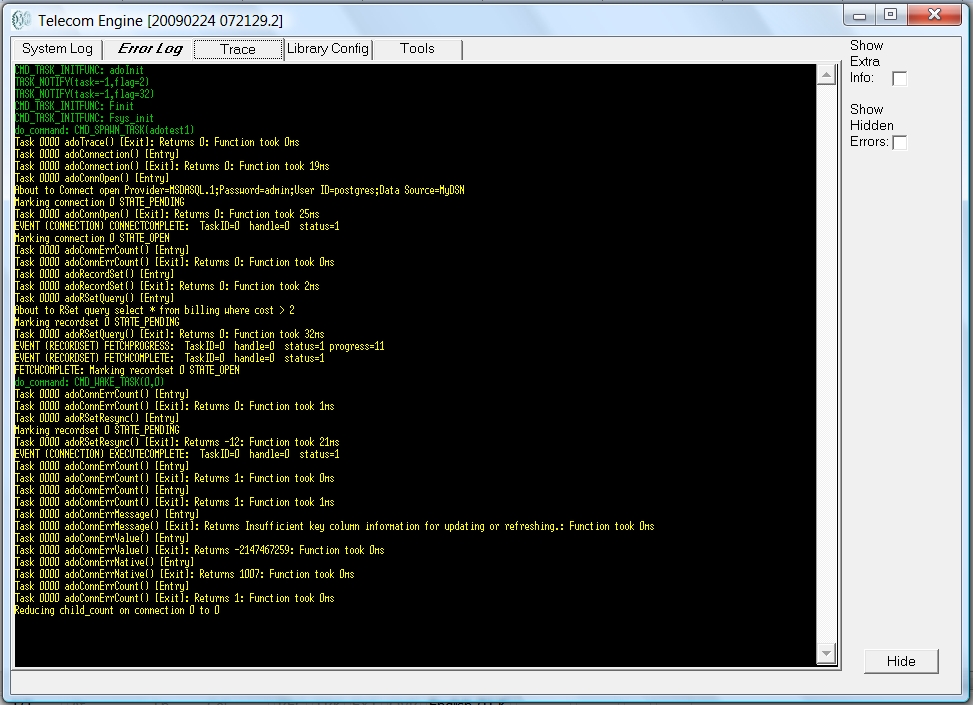
Notice that in the above screen shot the Error Log tab is shown in Bold Italic font to show that there are unviewed messages in the error log. This will occur for all scrolling log windows if another tab is being viewed when a message arrives at on that scrolling log window.
Also notice on the right there are two check boxes:
i) Show extra info.
ii) Show hidden errors.
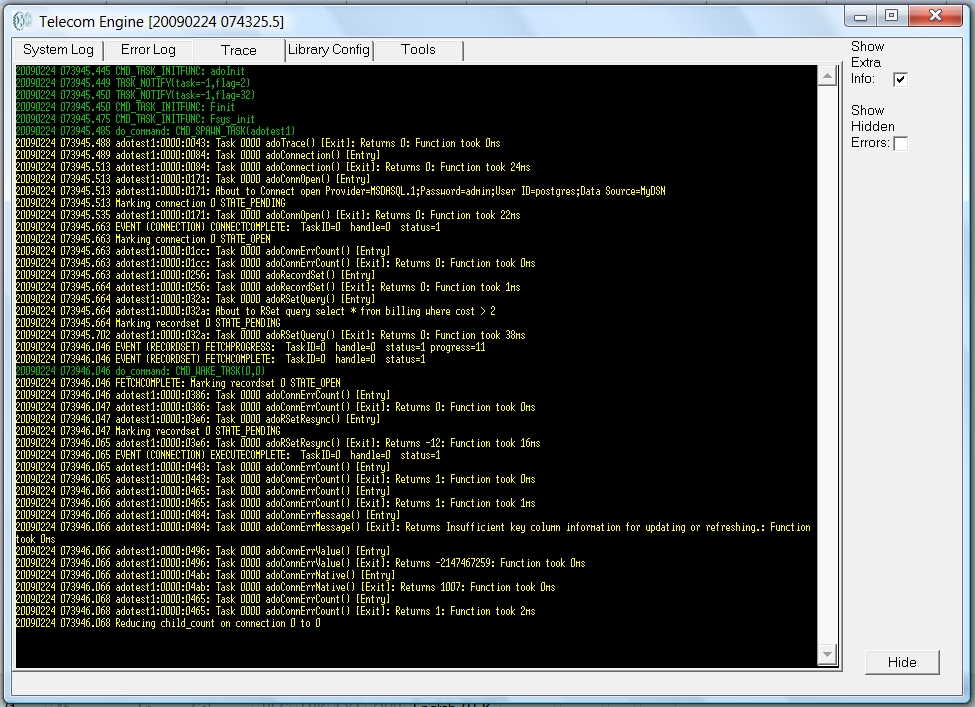
The show extra info allows for the full log message to be displayed in the scrolling window area exactly as it appears in the log file on disk. By default only the text part of the log file is shown in the scrolling log window whereas on disk the full log format is written.
The full log format is as follows:
<YYYYMMDD HHMMSS.mmm> [<Application Task Info>] <Log MessageText>
The [<Application Task Info>] field is only written if the log message can be traced to a specific running task (as opposed to a background thread or other system generated log message). The format of the <Application Task Info> is as follows:
<Program name>:<Task ID>:<Program Counter>
For example the following excerpt is taken from an ERRLOG0.LOG file and shows both forms of the log message:
20090224 072033.068 adotest1:0000:03e6: @E Exception caught: Unspecified error (0x80004005)
20090224 072033.072 adotest1:0000:03e6: @E ... Caused by: adoRSetResync(0,1):
20090224 072033.076 adotest1:0000:04b2: Err: Insufficient key column information for updating or refreshing. number=80004005 native=3ef
20090224 072033.083 KillTask ID=0 found in connection handle 0
20090224 072033.083 KillConnection handle 0 found in recordset handle 0
The first three lines were generated by the asotest1.tex application running as taskId 0000. The program counters give the position of the program counter in the byte code that caused the log message to be generated.
The last two lines were generated by the background thread of the CXADO.DLL libary and are some diagnostic messages generated for debug purposes.
Below is a screen shot of the same application that has been run with the 'Show Extra Info' check box ticked..
The 'Show Hidden Errors' check-box allows errors that have been suppressed by a call to term_errctl() to be displayed. Sometimes an application may wish to suppress certain error messages from being displayed to stop the scrolling logs from being overrun with unecessary error messages. By ticking this box then these messages will be displayed regardless of whether the application tried to suppress them with a call to term_errctl() or equivalent.
The 'HIDE' button down the bottom right causes the TEX.EXE application to shrink to an icon the system tray. Note that this icon will turn red if any error messages are written to the error log after the application has been minimised to the system tray to alert the user that errors have occurred.