|
Tools Tab
|   |
|
Tools Tab
| |
The tools tab provides a few mechanisms for dumping internal Telecom Engine Scheduler information or for manually killing or loading byte-code tasks and manually loading back-end libaries.
Below is a screen shot from the Tools Tab Window:
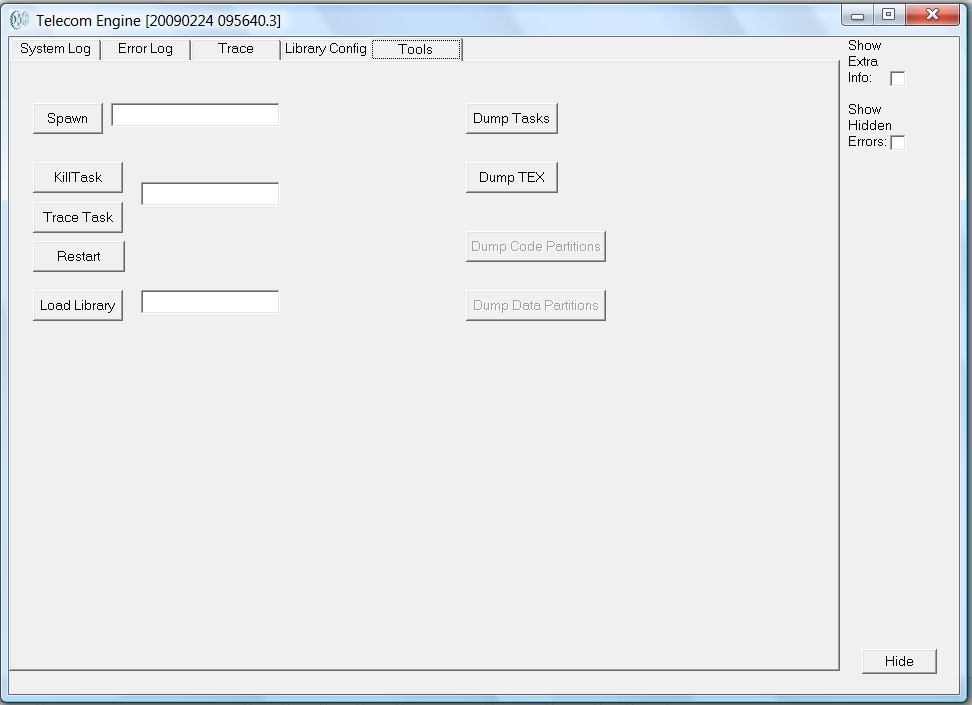
Extreme care should be taken when using any of the options on the left hand side of this form, particularly on a running system as it could disrupt the execution of important tasks. The registry entry HideTools can be set to prevent the Tools tab from being shown on a live system to prevent accidental disruption of the running tasks (see Registry Settings).
Below is a description of the buttons shown on this form:
|
Button |
Description |
|
Spawn Task |
This button will cause the byte-code file entered into to the adjacent edit box to be loaded into the Telecom engine Scheduler. |
|
Kill Task |
This button will kill the task ID entered into the adjacent edit box |
|
Trace Task |
The button will trace the task ID entered into the adjacent edit box |
|
Restart Task |
This button will restart the task ID entered into the adjacent edit box |
|
Load Libary |
This button will load the back-end Telecom Engine Libary file specified in the adjacent edit box. |
|
Dump Tasks |
This button will dump a list of all of the tasks current running in the system to the trace log. |
|
Dump TEX |
This button will dump a list of all the byte code (*.TEX) files that have been loaded |
|
Dump Data Partition |
Internal use only (disabled) |
|
Dump Code Partition |
Internal use only (disabled) |