|
Introduction
|   |
|
Introduction
| |
The Telecom Engine Run-Time consists of four parts as follows:
a) The Graphical User Interface (GUI) front-end (TEX.EXE).
b) The Telecom Engine Scheduler (CXDLL.DLL).
c) The Telecom Engine DLL back-end libraries (CXTASK.DLL, CXTERMX.DLL, CXSYS.DLL etc.).
d) The executable byte code files that are run by the scheduler (*.TEX) .
When the GUI front-end (TEX.EXE) is started it first loads the back-end Telecom Engine Libary DLLs that have been specified (either on the command line or in the registry). The initialisation functions for all of these libaries are then called to ensure that the back-end is fully initialised and ready.
You should make sure that the PATH environment variable includes the locations of all the Telecom Engine executables and DLLs.
The TEX.EXE program then loads the Telecom Engine Scheduler (CXDLL.DLL) in a separate thread and starts the scheduler engine.
Finally, any Telecom Executable applications that have been specified on the command line are then loaded into the scheduler to begin execution.
Execution will continue until a system exit request is received either from one of the byte-code application tasks or by attempting to close the Telecom Engine GUI appplication window.
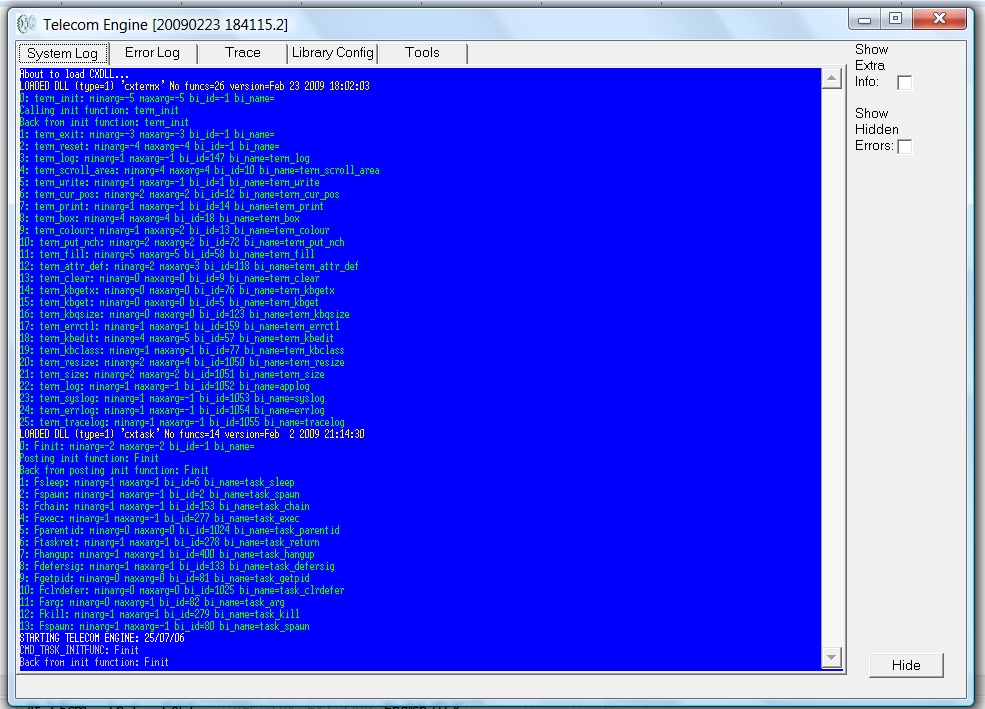
The Telecom Engine front-end application has a set of tabbed windows for each of the following:
a) The System Log tab.
b) The Error Log tab.
c) The Trace Log tab.
d) The Library Configuration tab
e) Tools Tab for managing the Telecom Engine.
Below is a screenshot showing the system log tab on a typical system start-up: