|
term_attr_def
|   |
|
term_attr_def
| |
Synopsis:
term_attr_def(attribute_id,fgcolour_24bit,bgcolour_24bit)
or
term_attr_def(attribute_id,VGA_256code)
Arguments:
atrribute_id - The atrribute ID for the define colour attribute (0..255)
fgcolour_24bit - The foreground colour (0..15)
bgcolour_24bit - The background colout (0..15)
or
atrribute_id - The atrribute ID for the define colour attribute (0..255)
VGA_256code - A VGA colour code made from a combination of one of the existing 16 predefined colours
Description: This function allows for one of up to 256 colour attributes to be defined by the user for use with the term_colour(user_defined_attribute) function. A colour attribute is an index into table of up to 256 entries which defines both the foreground and background colour in a single attribute ID. This attribute ID can then be passed to the term_colour(attributeID) function to define the current foreground and background colour.
The first form of the function allows for new colours to be defined that are not a combination of any of the 16 predefined colours. In this form the function takes the attribute_id and the 24 bit colour value for the new foreground and background in the fgcolour_24bit and bgcolour_24bit arguments.
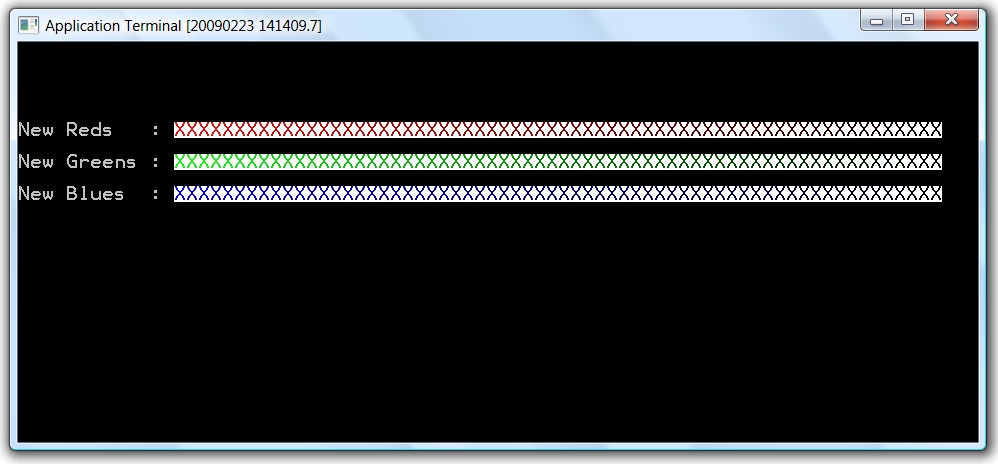
For example, the following program defines in turn 64 different shades of red, green and blue on white (in attributes 0..63) and uses these new attributes to display 64 characters on the screen:
const CL_RED=0x0000FF;
const CL_WHITE=0xFFFFFF;
const CL_16_WHITE=7;
const CL_16_BLACK=0;
main
int i;
# Define 64 new shades of Red on white
for(i=0;i<64;i++)
vid_attr_def(i,CL_RED-(i*4),CL_WHITE);
endfor
// Set the colour to white on black
term_colour(CL_16_WHITE,CL_16_BLACK);
term_cur_pos(5,0);
term_print("New Reds : ");
// Now print out 64 characters using the new colour attributes (0..63)
for(i=0;i<64;i++)
term_cur_pos(5,13+i);
// Set the colour to one of the new user defined colours
term_colour(i);
term_print("X");
endfor
# Define 64 new shades of Green on white
for(i=0;i<64;i++)
// Multiple by 256 to shift into Green bits of colour field (0x00FF00)
vid_attr_def(i,256*(CL_RED-(i*4)),CL_WHITE);
endfor
// Set the colour to white on black
term_colour(CL_16_WHITE,CL_16_BLACK);
term_cur_pos(7,0);
term_print("New Greens : ");
// Now print out 64 characters using the new colour attributes (0..63)
for(i=0;i<64;i++)
term_cur_pos(7,13+i);
// Set the colour to one of the new user defined colours
term_colour(i);
term_print("X");
endfor
# Define 64 new shades of Blue on white
for(i=0;i<64;i++)
// Multiple by 256*256 to shift into Blue bits of colour field (0xFF0000)
vid_attr_def(i,256*256*(0xFF-(i*4)),CL_WHITE);
endfor
// Set the colour to white on black
term_colour(CL_16_WHITE,CL_16_BLACK);
term_cur_pos(9,0);
term_print("New Blues : ");
// Now print out 64 characters using the new colour attributes (0..63)
for(i=0;i<64;i++)
term_cur_pos(9,13+i);
// Set the colour to one of the new user defined colours
term_colour(i);
term_print("X");
endfor
endmain
The output from the above program is shown below:
The second form of the function:
term_attr_def(attribute_id,VGA_256code)
Allows an attribute to be defined which is a combination of two of the existing predefined colours. The VGA_256code is a number between 0 and 255 created from the following formula: VGA_256code=16 * Background + Foreground
Where the Background and Foreground colours are taken from the set of 16 predefined colours shown in the following table.
|
Colour Name |
Colour Code |
|
Black |
0 |
|
Blue |
1 |
|
Green |
2 |
|
Cyan |
3 |
|
Red |
4 |
|
Purple |
5 |
|
Brown |
6 |
|
White |
7 |
|
Grey |
8 |
|
Bright Blue |
9 |
|
Bright Green |
10 |
|
Bright Blue |
11 |
|
Bright Red |
12 |
|
Bright Purple |
13 |
|
Bright Yellow |
14 |
|
Bright White |
15 |
Below is an example showing attribute ID 1 being set to white on cyan from the existing colour set..
// White on Cyan from the existing colour set
term_attr_def(1,7*16+3);
// Change to the new colour..
term_colour(1);