|
Introduction
|   |
|
Introduction
| |
The Application Terminal Library provides a text based application console based around the functionality of an old 16 colour VGA graphics monitor. For critical applications like IVR and other Telecomunications systems, which typically run without much user interference, a simple text based console terminal is usually sufficient to show the status of channels and to provide a scrolling log of events. A more complex graphical user interface (GUI) is not necessarily required on the live system (although a GUI interface for managing resources and database tables from a separate workstation might be required as a separate application).
Thus the Terminal Console Library is offered as part of the standard TE libary set and provides functions for simple terminal input, output and logging to offer the above basic functionality. When the Terminal Console Library DLL (CXTERMX.DLL) is loaded by the run-time Telecom Engine, the Application Console window is displayed on the screen that is 80 columns wide by 25 rows high, however this can be resized (either by the term_resize() function call or by setting some registry keys). Below is a screen shot from a typical application terminal screen that might be used for a running system:
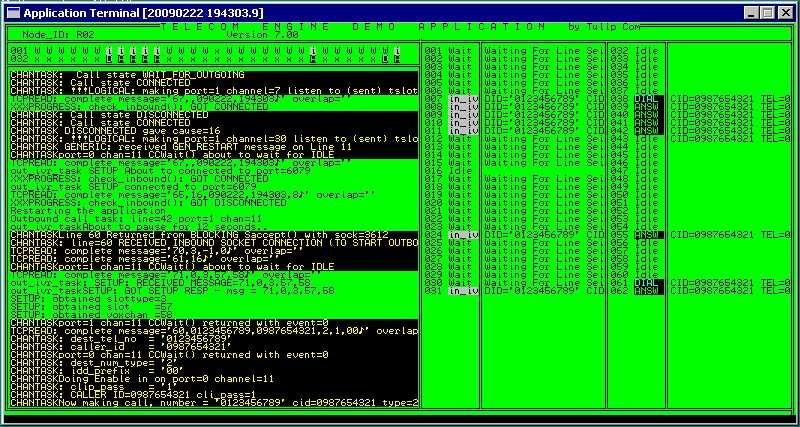
In the above example the top right shows single character channel status for each channel on each E1 trunk. Down the right hand side is a more detailed channel status and additional channel/call specific information. The main area rectangular area on the bottom left is the scrolling log window, showing all calls to the applog(), errlog(), tracelog() and similar functions to display scrolling messages.
Obviously the programmer is free to design a screen that is suitable for the needs of the application and may simply consist of a simple black and white scrolling log without any of the above channel status areas etc.
If an application requires something more sophisticated than a text based terminal window, then the programmer should consider writing a window GUI application and communicating with their program using the TCP/IP socket library (CXSOCK.DLL) to receive the appropriate information, or otherwise another more sophisticate terminal libary could be developed.
The font used by the Application Terminal console is 'Terminal' with character size 10. This can be changed by a call to term_resize() or by setting up some entries in the registry. The registry information that is used by the library is found under the following registry key:
HKEY_LOCAL_MACHINE\Software\Telecom Engine\CXTERMX
and the entries found under this key are as follows:
SCREEN_HEIGHT - The number of character rows for the terminal screen (Default 25)
SCREEN_WIDTH - The number of character columns for the terminal screen (Default 80)
FONT_SIZE - The size of the font used (Default 10)
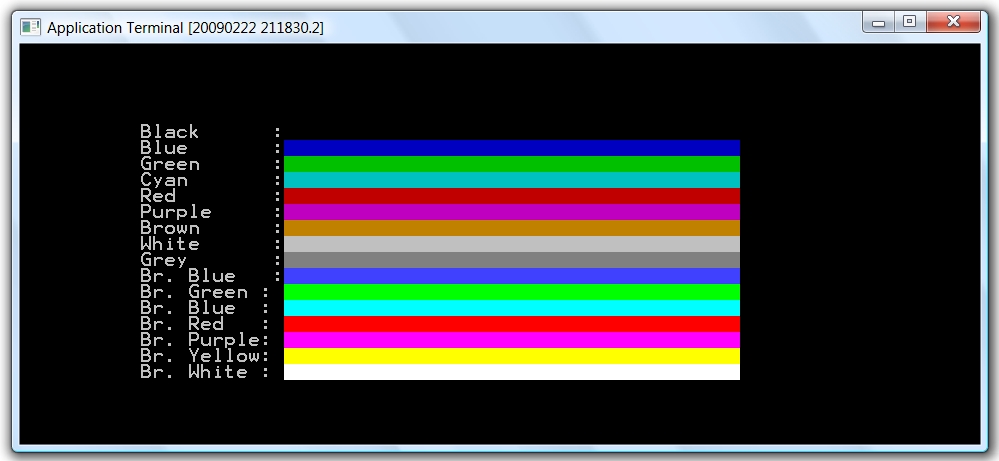
Since the application terminal is modelled on an old VGA 16 colour terminal we have the following 16 colours defined:
|
Colour ID |
24 Bit definition |
Colour Name |
VGA Code |
|
CL_BLACK |
0x000000 |
Black |
0 |
|
CL_BLUE |
0xC00000 |
Blue |
1 |
|
CL_GREEN |
0x00C000 |
Green |
2 |
|
CL_CYAN |
0xC0C000 |
Cyan |
3 |
|
CL_RED |
0x0000C0 |
Red |
4 |
|
CL_PURP |
0xC000C0 |
Purple |
5 |
|
CL_BROWN |
0x0080C0 |
Brown |
6 |
|
CL_WHITE |
0xC0C0C0 |
White |
7 |
|
CL_GREY |
0x808080 |
Grey |
8 |
|
CL_B_BLUE |
0xFF4040 |
Bright Blue |
9 |
|
CL_B_GREEN |
0x00FF00 |
Bright Green |
10 |
|
CL_B_BLUE |
0xFFFF00 |
Bright Blue |
11 |
|
CL_B_RED |
0x0000FF |
Bright Red |
12 |
|
CL_B_PURP |
0xFF00FF |
Bright Purple |
13 |
|
CL_B_YELLOW |
0x00FFFF |
Bright Yellow |
14 |
|
CL_B_WHITE |
0xFFFFFF |
Bright White |
15 |
The following program prints out the 16 colours used by the application terminal libary:
const CL_BLACK =0;
const CL_BLUE =1;
const CL_GREEN =2;
const CL_CYAN =3;
const CL_RED =4;
const CL_PURP =5;
const CL_BROWN =6;
const CL_WHITE =7;
const CL_GREY =8;
const CL_B_BLUE=9;
const CL_B_GREEN=10;
const CL_B_BLUE =11;
const CL_B_RED =12;
const CL_B_PURP =13;
const CL_B_YELLOW=14;
const CL_B_WHITE=15;
main
int i;
term_set_attr(CL_B_WHITE,CL_BLACK);
term_clear();
for(i=0;i<=15;i++)
term_cur_pos(5+i,10);
term_set_attr(CL_WHITE,CL_BLACK);
switch(i)
case 0: term_print("Black : ");
case 1: term_print("Blue : ");
case 2: term_print("Green : ");
case 3: term_print("Cyan : ");
case 4: term_print("Red : ");
case 5: term_print("Purple : ");
case 6: term_print("Brown : ");
case 7: term_print("White : ");
case 8: term_print("Grey : ");
case 9: term_print("Br. Blue : ");
case 10: term_print("Br. Green : ");
case 11: term_print("Br. Blue : ");
case 12: term_print("Br. Red : ");
case 13: term_print("Br. Purple : ");
case 14: term_print("Br. Yellow : ");
case 15: term_print("Br. White : ");
endswitch
term_set_attr(i,i);
term_cur_pos(5+i,22);
term_print(" ");
endfor
endmain
When this program is run the following output is displayed on the terminal screen: